Product updates
[Greek version] Create Bills instantly from imported myDATA documents
New feature February 17, 2026
We’re introducing a powerful new feature for organizations based in Greece that simplifies expense management and reduces manual data entry.
Starting today, you can create Purchase invoices (Bills) with a single click, directly from documents imported into Elorus via myDATA.
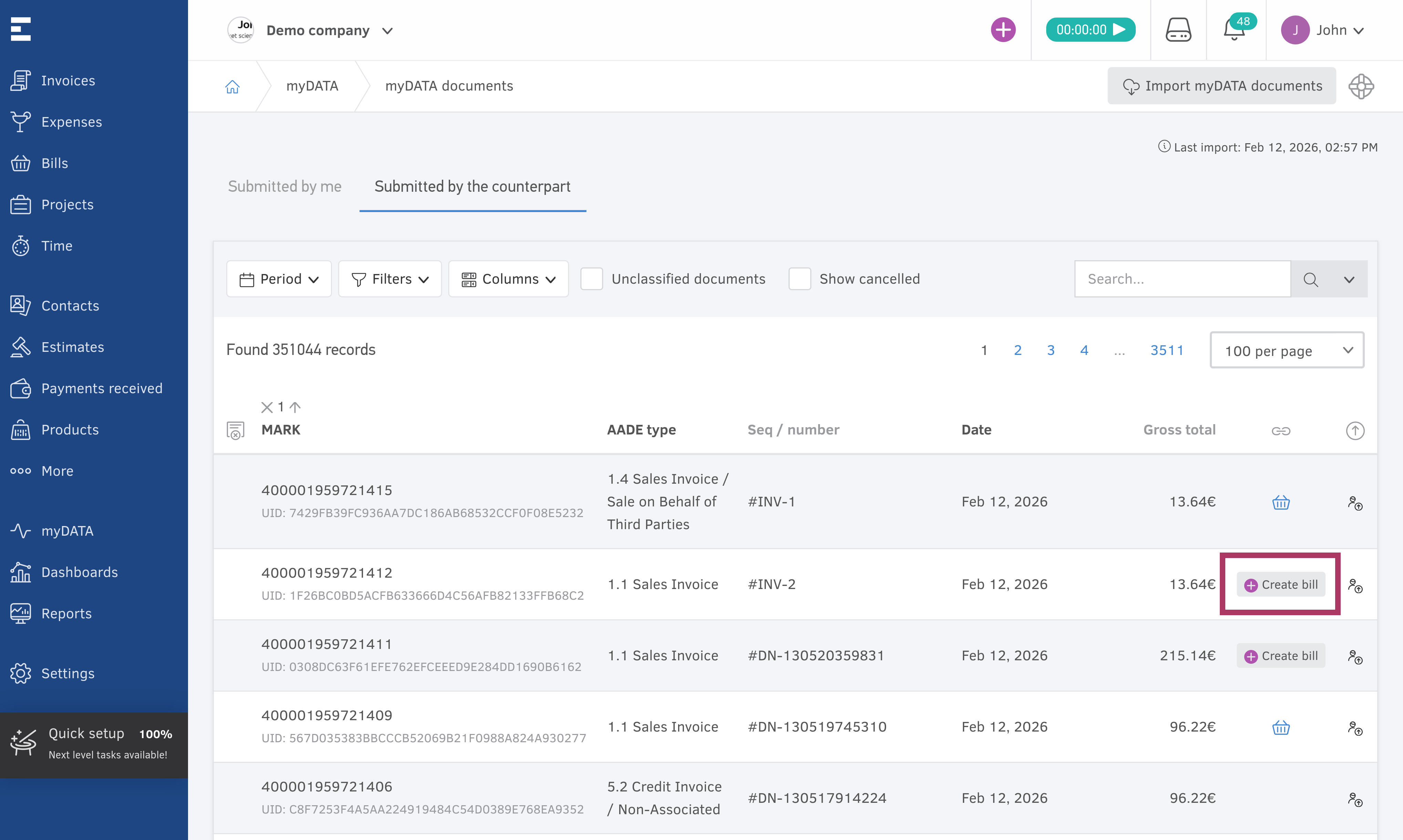
How it works
When Elorus imports documents that have been submitted to myDATA by your counterparty (i.e. your supplier), the system automatically analyzes their data.
If the document meets the required criteria, Elorus determines that it can be converted into a Purchase invoice.
On the “myDATA documents” list page, you will now see a “Create Bill” button next to all eligible records.
Currently, the feature supports the following myDATA document types:
- 1.1 – Invoice
- 2.1 – Invoice for services rendered
One click — no manual entry
By clicking the “Create Bill” button:
- A new Bill is automatically created in Elorus
- All relevant data is transferred from the myDATA record
- No manual data entry is required
This ensures your expenses are recorded quickly, accurately, and in full alignment with the data submitted to the tax authority.
Plan availability
This feature is available on paid subscription plans.
With this update, Elorus further streamlines compliance and day-to-day bookkeeping for Greek businesses—helping you keep your purchase records up to date with minimal effort.